

Panic buttons are a critical component of modern safety strategies across industries. Organizations from schools and elder care facilities to casinos are embedding emergency response capabilities into devices, apps, and platforms to better serve and protect their employees, customers, residents, students, and users.
But not all panic buttons—or panic button APIs—are created equal. While many systems can generate an alert, few can help ensure that the alert actually leads to meaningful action and response. Choosing the right panic button API means looking beyond the button itself to the infrastructure that helps move users from alert to action. Here's what to look for.
What Is a Panic Button API?
APIs, or Application Programming Interfaces, are software intermediaries between two different applications or systems that allow them to communicate, interact, and synchronize data.
Panic button APIs enable applications or devices to initiate emergency workflows when activated and can be integrated into existing products and platforms.
How a Panic Button API Works
The workflow of a panic button API is simple—and it all starts with, literally, the push of a button. Here's how solutions like Noonlight's Dispatch API work in practice.
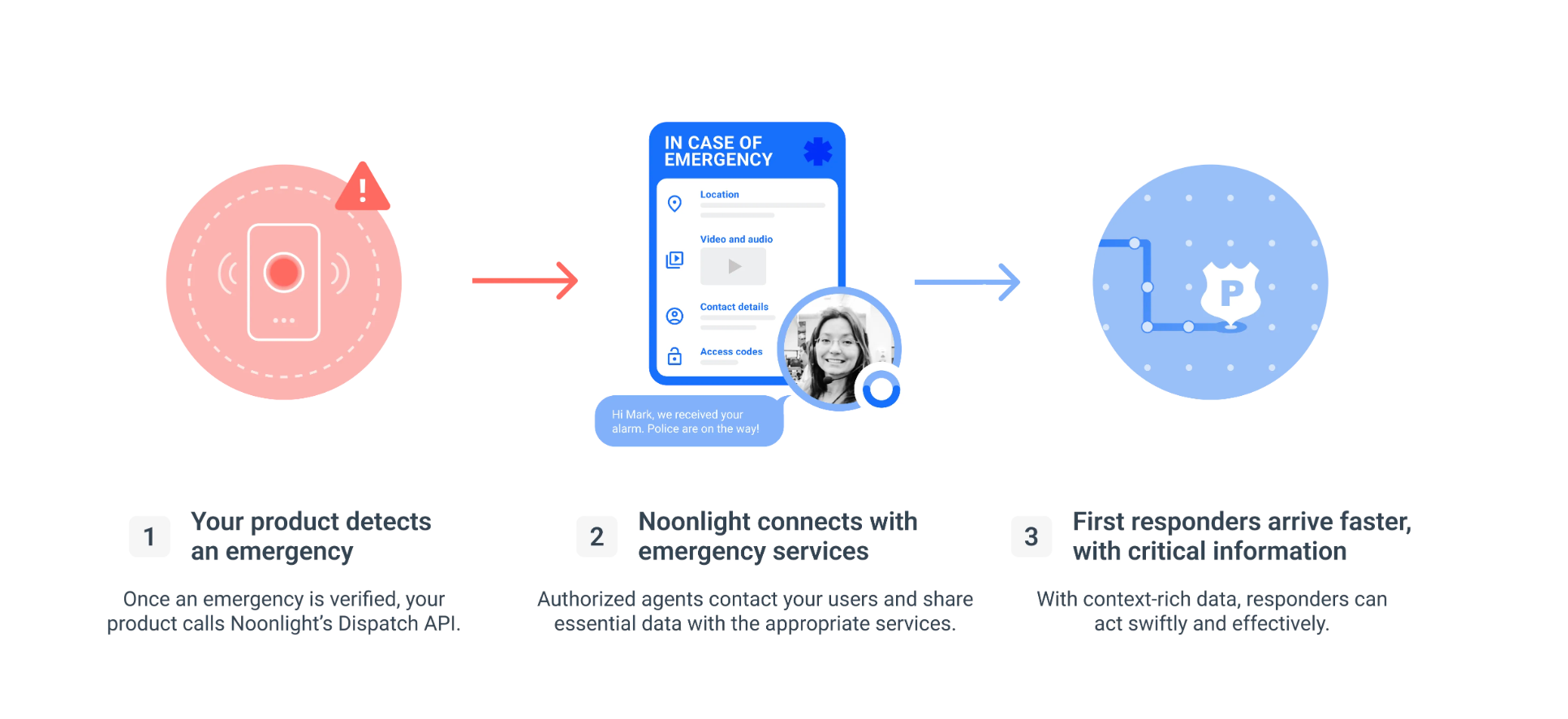
1. User activates the panic button
To begin the panic button workflow, the user activates the panic button. Whether it's an app, a physical button on a work or school badge, or a keychain alarm, this action initiates the emergency response workflow and other coordination to get help.
2. Response workflow is initiated
Once the button is activated, Noonlight-authorized agents connect with users via text message or phone call to assess the situation and provide support until the situation is resolved.
3. Emergency response is coordinated
If emergency services are needed, agents begin sharing critical data with the appropriate emergency services to enable a fast, informed response. With this context-rich data—such as location and incident details—shared directly with dispatchers, emergency responders can act quickly and effectively to provide assistance.
Why Panic Button Solutions Are Becoming Essential
Panic buttons are no longer nice-to-haves—they're increasingly becoming essential safety tools and, in some cases, are even required by law in certain U.S. states. Here are just a few reasons why.
Rising Expectations Around Safety and Emergency Response
Public-facing employees and lone workers are often at greater risk of threatening encounters because they often work without immediate support or access to on-site emergency alert systems. This underscores the need for fast, discreet access to help that delivers on the promise of employee, customer, and community safety.
It also reflects the broader shift from reactive to proactive safety strategies. While passive CCTV recording may have once felt sufficient, growing instances of retail theft, guest harassment, and other unsafe situations highlight the importance of identifying and responding to threats before they escalate.
Expansion of Safety Technology Beyond Traditional Security Systems
Security is no longer defined by traditional systems like cameras and other fixed infrastructure—it's becoming more modern, mobile, flexible, and connected.
With the rise of mobile apps, wearable technology, connected smart devices, smart buildings, and digital platforms, there's no reason employees should feel stranded or without access to help while working in the field or on their own.
Common Industries Adopting Panic Button Solutions
Panic buttons and panic button solutions are quickly becoming table stakes across a wide range of industries, including:
- Hospitality
- Healthcare
- Education
- Property management and real estate
- Lone worker and field service organizations
- Consumer safety applications
The Difference Between a Panic Button and a Panic Button Solution
A panic button feature—like an app on your phone or a physical alarm on your keychain—is a standalone feature that can sound an alert. While this can be effective for drawing attention and attracting nearby assistance, it's less effective at initiating a coordinated emergency response.
A panic button API, on the other hand, is not a physical product but a scalable integration that can be built into nearly any device, app, or software platform, such as Noonlight's Dispatch API. This enables organizations to connect users with emergency services and activate pre-built emergency response infrastructure, often including:
- Monitoring
- Verification
- Escalation workflows
- Dispatch support
- Location intelligence
- Incident management
- PSAP data sharing
Think of it this way: the panic button app or alarm is the product your user interacts with, while the panic button API powers everything that happens behind the scenes—from transmitting the alert to initiating emergency response.
Why Organizations Need Complete Solutions
Simply having a panic button isn't enough anymore, particularly for organizations with large numbers of lone workers or employees who regularly face higher-risk situations, such as retail theft or guest harassment.
With a complete solution powered by a panic button API, organizations can deliver faster response times, improve safety outcomes, provide greater peace of mind, and create a better overall user experience—all while reducing operational burden.
Common Applications for Panic Button APIs
One of the biggest advantages of panic button APIs is their flexibility. They can be integrated into nearly any software, device, or hardware, making the potential use cases almost limitless. Here are a few of the most common applications.
- Employee and lone worker safety: Protect workers in remote, isolated, or high-risk environments with fast access to emergency assistance.
- Hospitality and guest protection: Enable staff to discreetly request help during threatening situations or medical emergencies.
- Healthcare worker safety: Support clinicians, caregivers, and home health workers who may encounter unpredictable situations.
- School and campus safety: Connect students, faculty, and staff with Alyssa’s Law-compliant emergency resources during critical incidents.
- Property management and resident safety: Enhance emergency response for apartment communities, multifamily housing, and commercial properties.
- Personal safety applications: Embed emergency response capabilities into consumer-facing safety and wellness apps.
- Wearables and connected devices: Extend panic button functionality to smartwatches, pendants, and other IoT devices.
What to Look for in a Modern Panic Button API
When evaluating a panic button API, it's important to understand which features will help transform your product from a simple alerting tool into a complete emergency response solution. Here are some of the key capabilities to look for, all of which are present in Noonlight's Dispatch API.
Flexible Integration Options
One of the biggest benefits of an API is its flexibility. From mobile apps and IoT devices to wearables and security systems, a modern panic button API should integrate seamlessly into the products and platforms your users already rely on.
Reliable Location Intelligence
Another key factor to consider is real-time location sharing—an essential capability for getting emergency services to your user quickly. By collecting accurate location data, along with relevant incident context when available, providers can share this information directly with dispatchers to support faster, more informed emergency response.
Verification and Response Workflows
It's important to ensure the panic button API you choose has a well-developed response workflow behind it.
For solutions like Noonlight's Dispatch API, that means combining AI-powered technology with human assessment to expedite incident verification and help ensure the appropriate response is delivered as quickly as possible.
Emergency Dispatch Capabilities
A panic button should do more than simply indicate that someone needs help—it should reliably connect users to it. Modern panic button APIs should provide streamlined coordination with emergency services and a response process users can depend on during critical situations.
Scalability and Reliability
Once a panic button API is integrated into your solution, it should be able to scale alongside your business. Look for capabilities like enterprise-grade reliability, high availability, and infrastructure designed to support increasing incident volumes as your organization grows.
Human Support During Emergencies
Technology can initiate an emergency response, but people often need reassurance and guidance while help is on the way. Look for a panic button API backed by trained agents who can communicate with users, assess evolving situations, and remain connected throughout an incident when appropriate. Whether gathering additional context for responders or simply providing comfort during a stressful situation, human support can improve both the user experience and emergency response outcomes.
Reporting and Insights
Your API provider shouldn't just power your product, they should act as a partner invested in your long-term success. Look for providers that offer incident reporting, operational visibility, and performance insights, along with access to metrics that help you evaluate and improve your safety program over time.
What Happens Next Matters Most
Panic buttons are increasingly becoming a foundational safety feature, but successful safety programs require more than a button—they require an effective, coordinated response strategy.
Ultimately, the goal isn't simply to generate an alert. It's to help people move from alert to action as quickly, reliably, and safely as possible. The right panic button API makes that possible by connecting emergency alerts to the response workflows that help people get the assistance they need.
As safety expectations continue to evolve, organizations should evaluate not only how alerts are generated, but how they're transformed into action.
Frequently Asked Questions
What is a panic button API?
A panic button API enables developers and organizations to integrate emergency alert functionality into apps, devices, or platforms. Depending on the provider, a panic button API may also support features such as location sharing, alert verification, escalation workflows, and emergency response coordination.
What is the difference between a panic button and a panic button solution?
A panic button is the mechanism used to trigger an alert during an emergency. A panic button solution includes the broader ecosystem needed to respond to that alert, such as monitoring, location intelligence, verification, escalation procedures, and emergency dispatch support.
How does a panic button API help improve emergency response?
A panic button API can streamline emergency response by connecting alerts with critical context, such as location information and user details, while supporting escalation workflows. This helps organizations respond more quickly and effectively when emergencies occur.
Who uses panic button APIs?
Panic button APIs are used by organizations across industries, including hospitality, healthcare, education, property management, lone worker safety, and personal safety applications. They are often integrated into mobile apps, wearables, connected devices, and workplace safety platforms.
What should organizations look for in a panic button API?
When evaluating a panic button API, organizations should consider integration flexibility, location accuracy, response workflows, emergency dispatch capabilities, scalability, reliability, and data security. The most effective solutions help connect alerts to meaningful action.
Can a panic button API be integrated into an existing app or platform?
Yes. Most modern panic button APIs are designed to integrate with existing mobile apps, web platforms, wearables, and connected devices. This allows organizations to add emergency response capabilities without building an entirely new safety platform from scratch.
.svg)